658. Find K Closest Elements – Solution

Question

Difficulty: medium
Topics: Array, Two Pointers, Binary Search, Sliding Window

Given a sorted integer array arr, two integers k and x, return the k closest integers to x in the array. The result should also be sorted in ascending order.

An integer a is closer to x than an integer b if:

  • |a - x| < |b - x|, or
  • |a - x| == |b - x| and a < b

Example 1:Input: arr = [1,2,3,4,5], k = 4, x = 3 Output: [1,2,3,4]

Example 2:Input: arr = [1,2,3,4,5], k = 4, x = -1 Output: [1,2,3,4]

Solution

This was a question that I struggled a lot. It was harder than usual binary search problems. There are many ways to think for this problem.

Solution 1: O(N⋅log(N)+k⋅log(k))

compute the distances between the elements and x, sort it and display the first k elements. When displaying it, sort again.

Solution 2: O(log(N)+k) – Bin. Search + 2 Pointers

Search the index of element closest to x. Then, start l and r pointers from there and expand them based on the smallest distance.

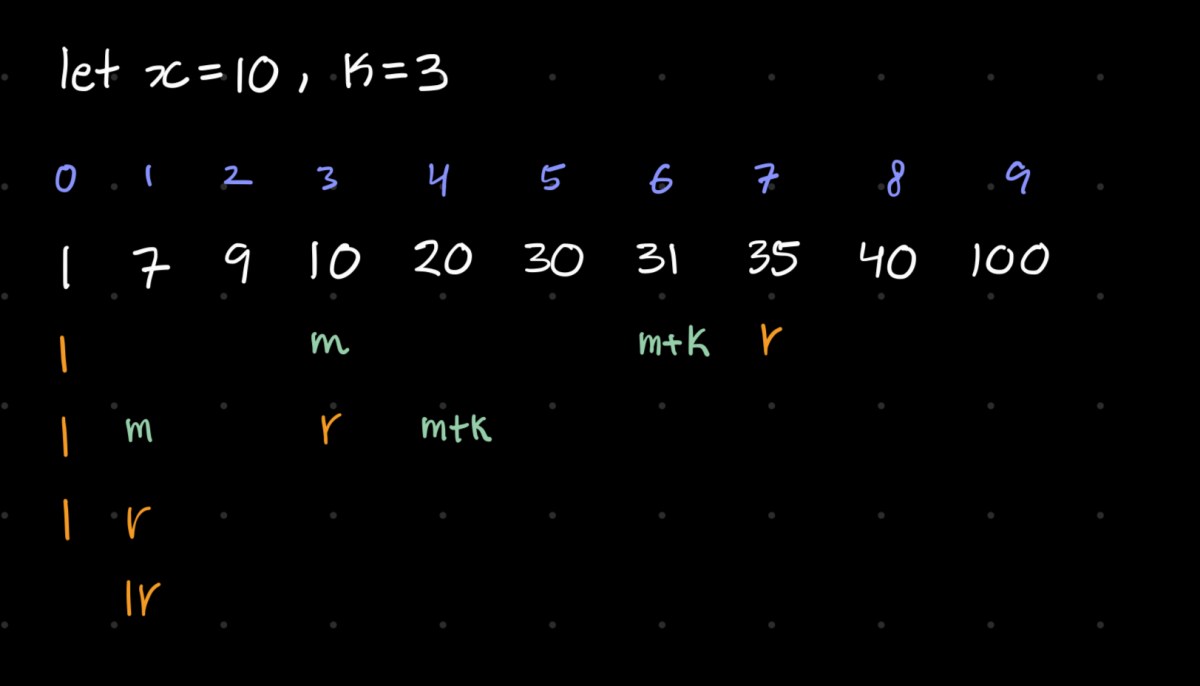
Solution 3: O(log(Nk)) – Find the left bound.

Search the left bound with binary search. Let l = 0 and r = N-k which is the maximum index that a left bound can be.

compute the mid point. Now, assuming the mid is the left bound, mid+k is the right bound. Then,

If value at mid is closer to x:

  • mid and further cannot be the left bound because then the right bound would be more distant from x than mid.

But, since there can be an even better left bound in the left side, we continue the bin search with the left side.

so we do r = mid;

If value at mid+k is closer to x:

  • index at mid or lower can’t be left bound. The left bound is somewhere between mid+1 ~ mid+k

so we do l = mid+1;
class Solution {
public:
vector<int> findClosestElements(vector<int>& arr, int k, int x) {
int l = 0, r = arr.size() - k;
while (l < r){
int mid = (l+r)/2;
if (x - arr[mid] > arr[mid+k] - x){
l = mid + 1;
}
else{
r = mid;
}
}
return vector<int>(arr.begin() + l, arr.begin() + l + k);
}
};

There is another way of seeing this: (from lee215’s solution post)

We compare the distance between x - A[mid] and A[mid + k] - x
If we assume A[mid] ~ A[mid + k] is sliding window

case 1: x – A[mid] < A[mid + k] – x, need to move window go left
——-x—-A[mid]—————–A[mid + k]———-

case 2: x – A[mid] < A[mid + k] – x, need to move window go left again
——-A[mid]—-x—————–A[mid + k]———-

case 3: x – A[mid] > A[mid + k] – x, need to move window go right
——-A[mid]——————x—A[mid + k]———-

case 4: x – A[mid] > A[mid + k] – x, need to move window go right
——-A[mid]———————A[mid + k]—-x——

Reflection

I think whenever using binary search, I should think about based on what criteria I will choose the left side or the right side given a mid point. This was particularly harder because I didn’t think of finding the left bound. Let’s remember that when finding a range, I can try to find only left or right bound.

34. Find First and Last Position of Element in Sorted Array – Solution

Difficulty: medium
Topics: array, binary search

Given an array of integers nums sorted in non-decreasing order, find the starting and ending position of a given target value.

If target is not found in the array, return [-1, -1].

You must write an algorithm with O(log n) runtime complexity.

Example 1:
Input: nums = [5,7,7,8,8,10], target = 8
Output: [3,4]

Example 2:
Input: nums = [5,7,7,8,8,10], target = 6
Output: [-1,-1]

Example 3:
Input: nums = [], target = 0
Output: [-1,-1]

Leetcode problem 34

Solution

The way to handle this is by finding start and end pos separately.

We can do this by implementing separate binary searches to find lower bound and higher bound of target.

OR just make one binary search to find the lower bound of target and find the end position by finding the lower bound of (target+1).

The first approach is shown below:

class Solution {
public:
    vector<int> searchRange(vector<int>& nums, int target) {
        // if it's empty,
        if (nums.size() == 0){
            vector<int> res = {-1, -1};
            return res;
        }
        
        // search left bound
        int l = 0, r = nums.size()-1;
        int leftrange = 0;
        while (l < r){
            int mid = (l+r)/2;
            if (nums[mid] >= target) r = mid;
            else l = mid+1;
        }
        if (nums[l] != target) leftrange = -1; 
        else leftrange = l; 

        // search right bound
        l = 0, r = nums.size()-1;
        int rightrange = 0;
        while (l < r){
            int mid = (l+r+1)/2;
            if (nums[mid] <= target) l = mid;
            else r = mid-1;
        }
        if (nums[l] != target) rightrange = -1;
        else rightrange = l; 
        
        // print the result
        vector<int> res = {leftrange, rightrange};
        return res;
    }
};

By only implementing binSearch that finds lower bound:

class Solution {
private:
    int lower_bound(vector<int>& nums, int low, int high, int target){
        while(low <= high){
            int mid = (low + high) >> 1;
            if(nums[mid] < target){
                low = mid + 1;
            }
            else{
                high = mid - 1;
            }
        }
        return low;
    }

public:
    vector<int> searchRange(vector<int>& nums, int target) {
        int low = 0, high = nums.size()-1;
        int startingPosition = lower_bound(nums, low, high, target);
        int endingPosition = lower_bound(nums, low, high, target + 1) - 1;
        if(startingPosition < nums.size() && nums[startingPosition] == target){
            return {startingPosition, endingPosition};
        }
        return {-1, -1};
    }
};

Since we already have a built in lower_bound library function, we can use that:

class Solution {
public:
    vector<int> searchRange(vector<int>& nums, int target) {
        int startingPosition = lower_bound(nums.begin(), nums.end(), target) - nums.begin();
        int endingPosition = lower_bound(nums.begin(), nums.end(), target+1) - nums.begin() - 1;
        if(startingPosition < nums.size() && nums[startingPosition] == target){
            return {startingPosition, endingPosition};
        }
        return {-1, -1};
    }
};